
The TI-30XIIs by Texas Instruments is a calculator that many Mt.Vernon students are familiar with, but the true potential of the calculator is often left unused. One key function that is often forgotten is the 5 variable storage. This function can help to make mental math easier and also allow easy plugging in of complex formulas.

The variable function is often overlooked, but can be invaluable in complex multi step calculations. There are two main buttons that are essential to the variable function: STO and MEMVAR. STO is to write and MEMVAR is to read. For example to solve the quadratic formula the variables can be used to obtain a more reliable and accurate result with less effort. For the set up, Define A, B and C. EX: A=-5, B=6.3, C=3.
- Plug in variables,
- -5 , STO , ENTER
- 6.3 , STO , →B , ENTER
- 3 , STO , →C , ENTER
- (image 3)
- Write out equation (-B ± √(B² – 4AC)) / 2A.
- Calculator inputs: ( , neg , MEMVAR , →B , ENTER , + , 2nd , x² , MEMVAR , →B , ENTER , x² , – , 4 , MEMVAR , ENTER , MEMVAR , →C , ENTER , ) , ) , ÷ , ( , 2 , MEMVAR , ENTER , ) , ENTER
-

The STO function is the core of this variable driven approach.
- To solve for the second root just edit the plus sign to a minus sign using: ↑ , → , → , → , – , ENTER
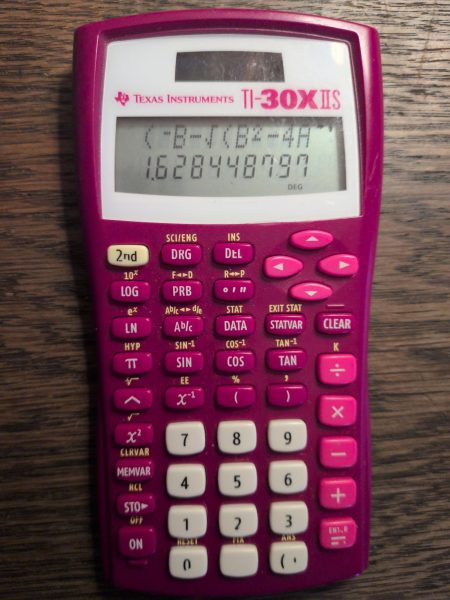
This gives an unrounded answer that can also easily be reused, just change the variables and hit ↑ until finding the quadratic formula that was written, then just hit ENTER and it will solve it for the new set of variables. By entering, 5 , STO , →C , ENTER, and then go back up to the quadratic formula, and hitting enter again, it gives the answer for C=5 instead of C=3.
The second way to use the variable function is much simpler, basically as a place to hold an answer instead of writing it down on the paper. For example doing the quadratic formula but saving the intermediate steps to the variable instead of rounding it on paper.
- √(6.3²-4*-5*3)
- 2nd , x² , 6.3 , x² , – , 4 × , -5 , × , 3 , ) , STO , ENTER
- (-6.3+A)/(2*-5)
- ( , neg , 6.3 , + , MEMVAR , ENTER , ) , ÷ , ( , 2 × -5 , ) , ENTER
Just invert the plus sign for the negative root. This is a less complicated way, but still preserves the benefits of accuracy, while also being widely applicable. Instead of writing down a rounded number to the paper a user can use the STO key to just hold it in memory for later use. Of course, if a teacher wants work shown, write down a rounded number and use the STO key, but it is just a nice way to reduce cognitive load during mental math.
The other two functions that are accessed by the 2nd key are “RCL” and “CLRVAR.” RCL allows the user to print a variable to the screen, and the CLRVAR wipes the variable memory. Both of these functions are not super common to use, but can have niche use. The variable function is a very powerful tool no matter the level of math. For basic arithmetic it can be an easy way to remember a number and for complex formulas, it can be a great way to find solutions that require solving something multiple times using the same equation, or slightly modifying equations with the same inputs.


